
STEP 1:
- Install the Python 2.7.* or 3.* Binaries from python.org
- You can download the latest Python bits here from the official Python homepage.
- I typically installPython 2.7.* via the Windows x86 Installer and that is what I recommend.
- Here’s a direct link to the release page for the latest versionof Python as of writing this (2.7.3)- it has an X86 installer .
- Once you’ve successfully run the Python installer, you should see the following icons appear in your start menu or if you’re using Windows 8 like me, on your home screen:
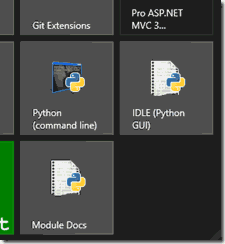
python Installation step – 1
- Once you have access to the Python command line and IDLE, you’re ready to move onto next step
STEP-2:
- In order to make it so you can access Python via any command line prompt (and not just the Python-specific one), you’ll need to add the newly-installed Python 2.7 directory to your “Path” system environment variable.
- This makes it easier to access Python and run scripts in whatever shell you’re using to using (Command Prompt, PowerShell,and my personal favorite: Git Bash.)
- So, go to Control Panel –> System Properties –> Environment Variables and select the PATH
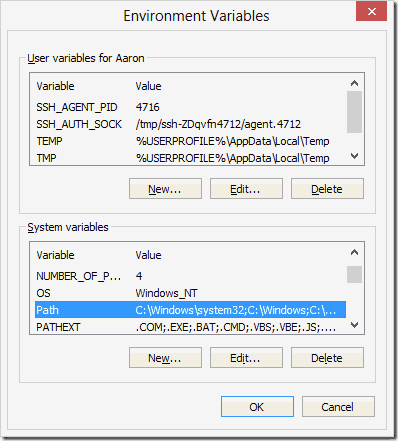 python Installation STEP-2
- Click Edit
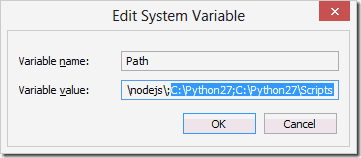
- And append the Python path to the end of the string – the default path will be something like
- C:\Python27.
- Also make sure you include the C:\Python27\Scripts in the Path too even if it doesn’t exist yet – this is where your package management tools, unit testing tools, and other command line-accessible Python programs will live.
- With that in place, you can now start the Python interpreter on any command prompt by invoking the python command.
- Let’s get our package manager set up for Python.
STEP-3:
- Install pip to Manage Your Python Packages
- There’s a couple of different options for package management in Python –pip is the one that doesn’t suck.
- Pip makes it trivial for us to install Python packages, like Requests.
- And we’re going to have to install packages pretty often if we’re working with third party tools and libraries, so this is a must-have.
- Pip has a detailed set of instructions on how to install it from source– if you don’t have the curl command on your system, just use your Git or even your web browser to download the source filementioned in their instructions.
Step-4:
- Once you have pip installed, you need to grab one last package –virtualenv.
- Packages in Python are installed globally by default – which means that when a package dependency changes for one project running in a given Pythonenvironment, it changes for all of them. Not good!
- virtualenv restores order to the universe by allowing you to create virtual Python environments, so you don’t have to worry about version conflicts between projects.
- And now that you have pip up and running on your system, it’s trivial to install virtualenv via the command line:
- C:\> pip install virtualenv
- And you’re done!
 Technology Blog